
Now there is a simple point-of-sale software package for the bowling Pro Shop and small business. POS Pro Shop is a simple, easy to use program that works with Microsoft Windows to allow you to maintain customers, take orders, track inventory and run a variety of reports. It is designed for quick access at your fingertips using simple key strokes, the mouse or a barcode scanner. Our software is fully compatible with the latest 64-bit Windows 7 and 8 technology!
Compatible with 64-bit Windows 7, 8, 10
Compatible with 64-bit Windows 7, 8, 10
Main POS Pro Shop screen:

The main screen allows you to take sales orders and navigate the program easily using keyboard shortcuts, mouse, or barcode scanner.
POS Pro Shop Features
- • Create Sales Orders
- • Track Inventory
- • Sales Order Reports
- • Inventory Reports
- • End of Day Reports
- • Print Sales Receipts
- • Barcode Scanner Support
- • Tax-Exempt Sales
- • Inventory Categories
- • Entire Order Discounts
- • User Password Access
- • Gift Cards
- • Export to Excel (CSV)
- • Backup & Restore
- • AKM Pro Shop Integration

Contact Us

Buy POS Pro Shop
Select Sale/Invoice Screen:
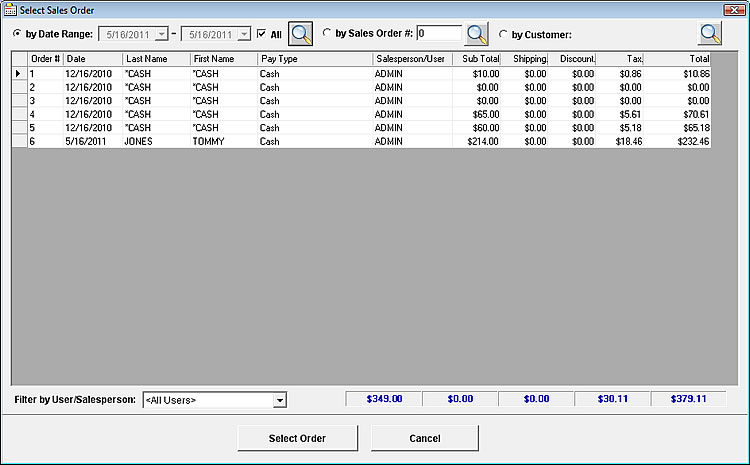
After completing a sale or invoice, this screen makes managing your transactions simple. You can quickly find any invoice, review your sales history, or export data for your reports. It also helps you spot trends in your sales so you can make informed decisions. Everything you need is in one place, saving time and keeping your business running smoothly.
Add/Edit Inventory:

With this interface, you can easily add, edit, or remove items and keep your stock levels accurate as new products arrive. It gives you a clear view of your inventory, so you can update product details and adjust quantities to match your business needs. You can also track trends and performance, helping you make decisions that keep your business running smoothly.
Select Product from Inventory:
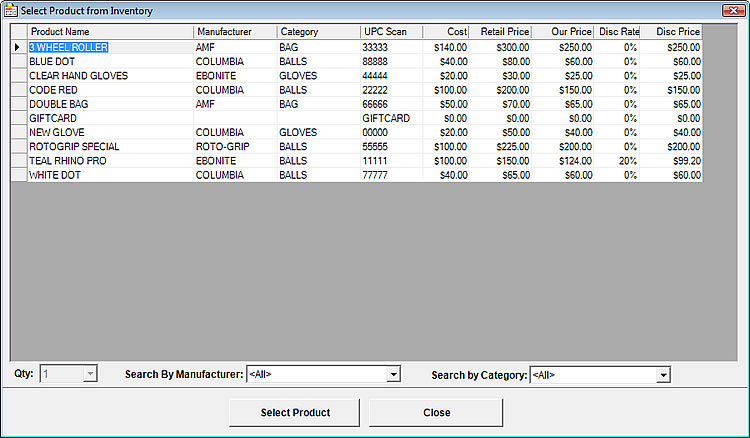
This pop-up grid makes it easy to find and select items while taking orders. With just a few clicks, you can quickly locate the exact product you need, helping ensure every order is accurate and on time. It’s a straightforward tool that keeps your workflow smooth and your customers satisfied.
Contact Us
Buy POS Pro Shop
Edit Customer:
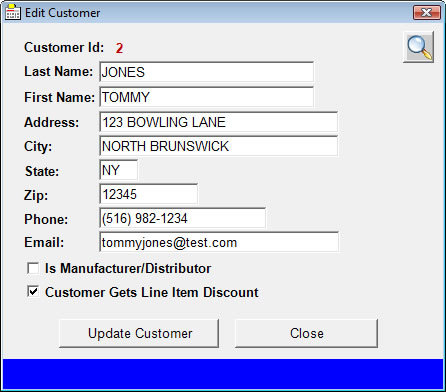
After you have saved an order, you still have the ability to update or correct the customer’s information at any time. This includes details such as the customer’s name, address, phone number, email, and any preferences regarding discounts or manufacturer/distributor status. Keeping this information accurate ensures that future orders, communications, and records reflect the most up-to-date customer details.
Inventory/Item Sales Report:
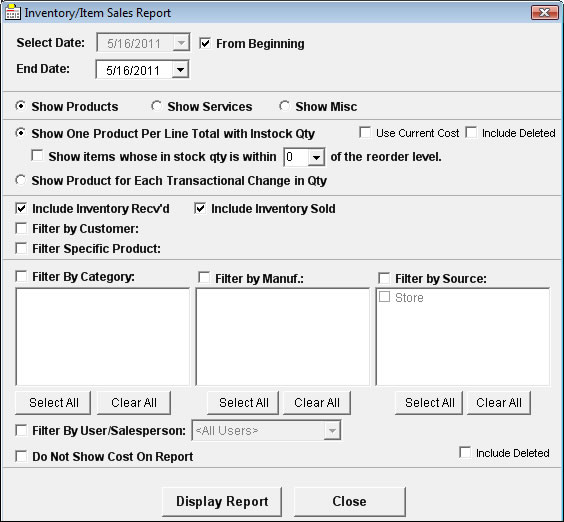
The reports section allows you to do a wide variety of reports on your sales and inventory.
The screen above is mainly for tracking inventory. Which items are at the reorder level? It also shows cost and profit on sold items.
It can also group each item by totals or show each change in quantity. There is also a sales report that shows what items have been sold belonging to a specific sales order.
You also have the option to filter out on certain data.
Below is another sample report called "End of Day Sales Order Totals" Report:
Below is another sample report called "End of Day Sales Order Totals" Report:

POS Pro Shop can connect directly to your AKM Pro Shop customer database. For example, when a customer comes in for a ball to be drilled, you can enter their bowler and hand information in AKM Pro Shop. Then, from POS Pro Shop, simply search for the customer, create the sale, and print a receipt.
Keep in mind, this software isn’t limited to bowling pro shops—it can work in other industries as well. Be sure to download our demo and evaluate it to see if it meets your business needs.
To use the POS software with a cash drawer, you’ll first need a way to open the drawer—usually by clicking a shortcut or running a command through your cash drawer software. Once that’s set up, you can program the cash drawer button in POS Pro Shop by entering that command in the settings.
Keep in mind, this software isn’t limited to bowling pro shops—it can work in other industries as well. Be sure to download our demo and evaluate it to see if it meets your business needs.
To use the POS software with a cash drawer, you’ll first need a way to open the drawer—usually by clicking a shortcut or running a command through your cash drawer software. Once that’s set up, you can program the cash drawer button in POS Pro Shop by entering that command in the settings.
Contact Us
Buy POS Pro Shop
Purchase POS Pro Shop for Windows – $239.00
System Requirements

- • Windows XP – Windows 7/8/10/11 (32/64 bit)
- • 1GHz Processor or better
- • 256MB RAM minimum
- • 10GB free disk space
- • Printer & barcode scanner recommended